Amenify Resident
- 4.0
- Rating
- 50.00K
- Installs
- Free
- Price
 Analysis by App-foxy
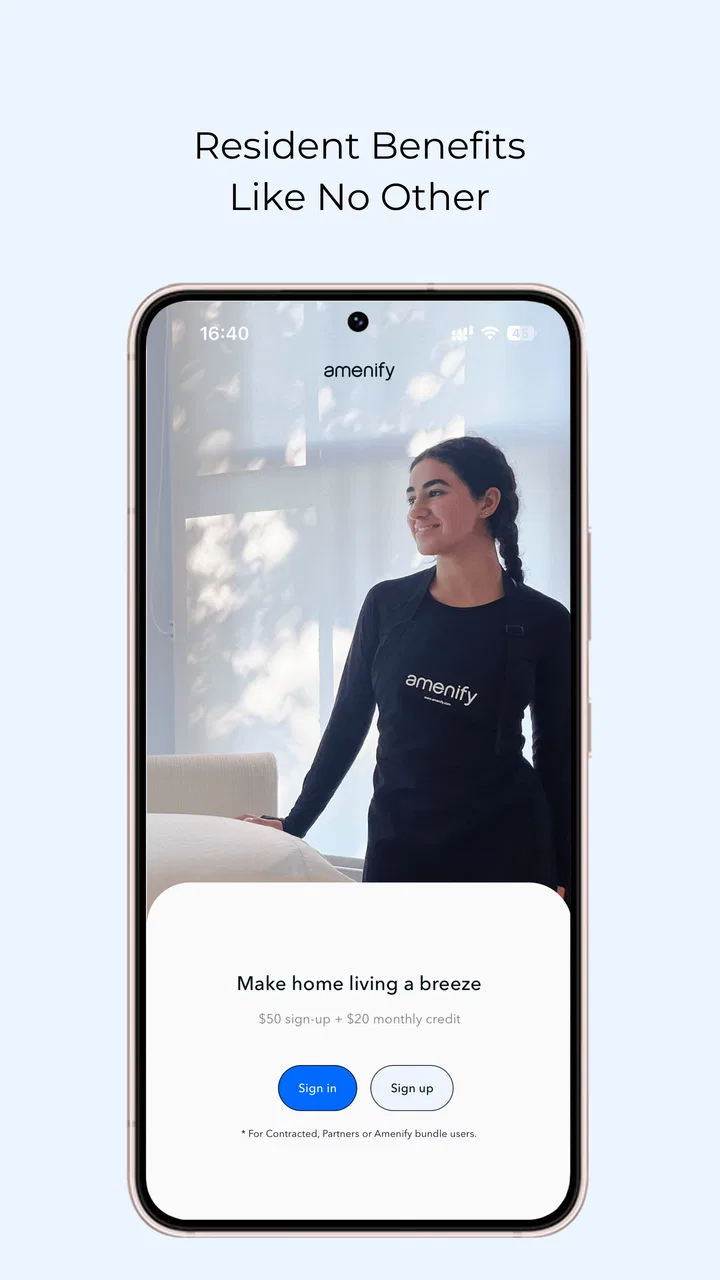
I approached Amenify Resident as a practical home-services app rather than something to browse casually. Its purpose is straightforward: it connects residents with in-home services supported by Amenify, a developer serving communities across the United States. That sounds simple, but the real value depends on how smoothly the app fits into the way your building or community already handles services.
My overall impression is that this is most useful when you already live in a participating community and want one place to start a service request. It is less compelling as a general-purpose marketplace for anyone looking for a cleaner, repair person, or other household help. That distinction matters, because many first-time users may expect an open directory, while the resident-focused design points toward a more specific experience.
The app is free, suitable for Everyone, and currently listed as version 2.0.5. It has reached over 50 thousand installs and holds a 4.2 average from around 1.1 thousand ratings, with close to 700 written reviews. Those figures suggest a useful level of adoption, although they do not remove the main question I would ask before installing: does my community actually support the services shown inside it?
You May Also Like

 AccuWeather: Weather Radar
AccuWeather Review: A Quick, Clear Forecast for Everyday Decisions
For everyday plans, the best forecast is the one you can understand quickly. AccuWeather makes rain timing, radar, and local conditions easy to act on, with a few trade-offs.

 Hill Climb Racing
Why Hill Climb Racing Still Turns Crashes Into One More Run
A tiny car, a bumpy hill and one more upgrade: Hill Climb Racing keeps resurfacing because its simple chaos makes every near-miss feel personal.

 AliExpress - Shopping App
AliExpress Makes Global Shopping Feel Personal, but Shoppers Bear the Risk
AliExpress turns a global marketplace into a pocket-sized discovery engine. Its reach is useful, its shopping loop compelling, and its trade-offs easy to miss.

 Lords Mobile: Kingdom Wars
Lords Mobile Is a Kingdom-Building Routine, Not a Quick Match
A case-by-case verdict on the building, battles, device demands, and social commitments that make Lords Mobile rewarding for some players and exhausting for others.

 PDF Scanner app - TapScanner
TapScanner Makes Paperwork Easier to Capture, Check, and Share
TapScanner makes scanning with a phone feel less like a rescue operation and more like a dependable step in getting work done. Its capture tools are useful, though not flawless.

 Block Blast!
 Shows How Much a Puzzle Game Can Leave Out
A quiet grid game shows why puzzle players increasingly value instant clarity, repeatable skill and low-pressure play—and where the genre still needs to catch up.
More From Our News Desk
View All News


Getting past the first points of friction
The first place I would expect users to get stuck is not the service itself, but the connection between the app and their residence. A resident app usually needs enough context to show the right options, and a mismatch in community details can make the experience look empty, incomplete, or confusing. Before assuming the app is broken, I would carefully check the property information entered during setup and make sure it matches the details used by the building or housing community.
This is also why I would not judge Amenify after opening it once. A service platform can appear limited when the account is not associated with the correct residence. If you recently moved, changed units, or manage more than one address, take a moment to review which home the app is using. The most important practical insight is that the resident connection is part of the product experience, not just a minor registration detail.
I would also keep expectations realistic about availability. Amenify is described as technology powering many in-home services for residents across the United States, but that does not mean every resident sees the same service menu. Communities can differ in what they make available, and household needs differ as well. If you install it expecting a universal catalog, you may come away disappointed even when the app is working as intended.
For that reason, I would use the app as a starting point for services connected to my residence, not as a replacement for every local option. If I needed a specialist who was not represented through the resident experience, I would compare independent providers separately. That approach avoids wasting time trying to force Amenify into a role it was not designed to fill.
Setup checks worth doing before requesting anything
My setup routine would be deliberately simple. I would install the current version, open the app, and confirm the residence details before spending time exploring service choices. I would then read each request screen carefully, especially the address, unit information, preferred timing, and any notes field that appears. Small errors are more troublesome in home services than in ordinary shopping because a provider needs to reach the correct door and understand what is expected.
I would also prepare a concise description of the job. Instead of writing “please clean the apartment,” I would specify the area, the type of help needed, and any access information the provider should know. This is not a hidden feature, but it is an important workflow improvement: clear instructions reduce the chance of a request being misunderstood and make later follow-up easier.
Another useful habit is to take a moment to review the request before submitting it. Check whether the selected service matches the actual task and whether the timing works for someone to be present if that is required. When an app brings several household services together, it is easy to move quickly through a familiar-looking form and miss a detail that matters more once the appointment is underway.
I would not assume that installing the app automatically solves every account issue. If the community association, property manager, or residential operator has its own resident records, the information in those systems may matter to the app experience. When the residence cannot be found or the available options look wrong, the sensible next step is to confirm the community’s participation and the correct resident details rather than repeatedly reinstalling the application.
That check is especially important for people who have just moved. A new address may be correct in daily life but still require the resident record to be updated before a service platform recognizes it. I would contact the relevant property office or resident support channel if the address remains unavailable after checking the spelling and unit information. Repeatedly creating new accounts could make the situation harder to untangle.
How I would use it in an ordinary week
Imagine that I have a busy week, guests arriving on Friday, and a household task that I do not have time to handle. I would open Amenify early, verify the residence, choose the closest matching service, and write a short note explaining the area that needs attention. I would review the request details before sending it, then keep the app available for any status information or follow-up that appears.
The advantage in that situation is not necessarily that the app offers more providers than a local search. The advantage is convenience within a resident setting. I am already dealing with a service connected to my home, rather than starting from an unfamiliar marketplace and separately explaining where I live. That can make the first step less cumbersome for participating residents.
There is a trade-off, though. If I needed several quotes, wanted to compare independent reviews, or had a highly specialized job, I would probably look beyond Amenify. A broader local-services marketplace may offer more choice, while a direct call to a trusted provider may be faster for a repeat task. Amenify makes the most sense when the resident connection and available service options are more valuable to me than maximum choice.
Recovering when a request does not go smoothly
If a request appears to stall, I would first separate three possibilities: an account problem, a service-availability issue, or a temporary connection problem. I would reopen the app, check whether the request is still visible, and avoid submitting duplicates immediately. Duplicate requests can create confusion for both the resident and whoever handles the service, particularly when two entries describe the same task.
If the request has disappeared, I would record the essential details before trying again: the residence selected, the service chosen, and the time I attempted to submit it. That small record makes support conversations more efficient because I can describe what happened without relying on memory. I would also check whether the app is fully updated through the normal app store process, since using the current version is a sensible first troubleshooting step.
When the problem is limited to one screen, I would close and reopen the app and retry once after confirming the connection. I would not keep tapping the submission button if the screen is slow to respond. Waiting briefly and checking for a confirmation is safer than creating multiple requests. This is one of those ordinary habits that prevents a technical hiccup from becoming a scheduling problem.
If the service request is visible but the details seem wrong, I would avoid assuming that editing it is always possible. I would look for the available follow-up or support route inside the resident experience and explain the correction clearly. If no suitable option is visible, the community’s resident support contact is the logical place to ask how that service is managed. The app may be the front door, while the property team or service coordinator handles the underlying change.
For login trouble, I would check the email or account information carefully, use the normal recovery process if one is offered, and avoid registering several accounts with slightly different details. A single consistent resident identity is easier to manage than multiple partial profiles. If access depends on the community record, I would mention the residence and unit when asking for help, without sending sensitive information through an untrusted channel.
When the app is not the real cause
Home-service problems often happen outside the app. A provider may be delayed by building access, parking, a locked entrance, a changed resident schedule, or instructions that were too vague. In those cases, deleting and reinstalling Amenify will not solve the underlying issue. I would first check the practical conditions around the appointment and make sure the person arriving can reach the correct location.
The same applies when a service is not shown. It may reflect the options connected to the particular community rather than a software failure. I would verify that I am viewing the correct residence and then ask the property or resident-support contact whether the service is available there. This is a better diagnostic path than assuming every Amenify user should see an identical menu.
Timing can also create false alarms. A request may require coordination between the resident, the service provider, and the community. If I submit something at the last minute, I would not treat a delayed response as proof that the application failed. I would review any status information available, allow a reasonable opportunity for processing, and use the appropriate support route if the request remains unresolved.
There is a broader lesson here: Amenify can organize the resident side of a service, but it cannot control every physical part of the visit. Clear instructions, correct access details, and realistic scheduling are just as important as the app interface. I would use the platform to reduce administrative effort, not to remove the need for ordinary communication.
Who will get the most from Amenify?
I think the app is a good fit for residents who want a convenient way to begin arranging in-home services through their community. It is particularly appealing if I prefer not to search from scratch every time I need household help, or if I value having service activity associated with my resident experience. The free price also makes it easy to try without committing money to the app itself.
It can also suit people who are comfortable with a guided, community-linked process. Instead of comparing a huge number of unrelated providers, I can focus on the services made available for my home. That narrower scope may feel reassuring when I want a straightforward request rather than a research project.
I would be more cautious if I lived outside a participating community, needed a service that was not listed, or wanted extensive control over provider selection. In those cases, a local directory, a specialist platform, or a recommendation from someone I trust could be a better match. Amenify is not automatically the best tool simply because the task happens inside a home.
I would also skip it as my only option for urgent repairs or technically complex work unless the required service is clearly supported and the response process suits the urgency. For a serious leak, electrical danger, or other immediate risk, the right emergency or qualified professional channel matters more than opening a resident-service app. The platform is better suited to planned household services than situations where delay could cause damage or danger.
How it compares with familiar alternatives
Compared with searching the web for a local provider, Amenify offers a more resident-centered starting point. I do not have to begin with a broad search and sort through businesses that may not serve my location. The compromise is that a general search can expose more alternatives, more independent reputation signals, and sometimes more specialized expertise.
Compared with contacting a property manager directly, the app may feel more convenient for routine service requests because it gives residents a dedicated digital entry point. However, the property team may still be the better contact for questions about building access, community participation, or a residence record that does not appear correctly. I would treat the two routes as complementary rather than assuming one replaces the other.
Compared with a large on-demand marketplace, Amenify appears more focused on the resident relationship than on giving me the widest possible provider comparison. That focus can simplify the first step, but it may limit the range of choices available to someone who wants to negotiate, compare several estimates, or choose a known independent contractor. The better option depends on whether convenience or breadth matters more for the job in front of me.
What I would check before relying on it
Before making Amenify part of my routine, I would test one ordinary, non-urgent request. I would confirm that my residence is recognized, that the available service matches my needs, and that I understand how updates or follow-up are handled. A small trial tells me more than simply opening the home screen because it reveals whether the app fits my community’s actual workflow.
I would keep the first request especially clear and avoid combining unrelated tasks in one description. If I need recurring help, I would learn how the app presents the service and whether the scheduling choices work with my routine before depending on it for a busy week. This is a practical trade-off: a little preparation at the beginning can prevent a rushed request from becoming a long exchange later.
I would also make sure the phone has a reliable connection when submitting a request and that I can access the account used during setup. These are basic checks, but they matter because resident-service apps sit between digital records and real-world appointments. If either side is inconsistent, the visible symptom may look like a service problem even when the cause is simply incorrect account or residence information.
My practical verdict
Amenify is a useful, focused option for residents whose communities connect them with its in-home services. I like the idea of having a resident-oriented route for household help, and the free installation makes experimentation low-risk. The app’s strongest quality is not unlimited choice; it is the possibility of making a community-linked service request more convenient than starting from a blank search page.
My recommendation comes with a clear condition: confirm that your residence is supported and take the setup details seriously. Most avoidable friction is likely to appear around the resident connection, service availability, request wording, or coordination outside the app. Checking those points early gives the platform a fair test and makes troubleshooting much more logical.
The current version, 2.0.5, reflects an established app rather than a brand-new experiment, and its 4.2 average from around 1.1 thousand ratings gives prospective users a useful signal of general reception. I would still judge it by my own community’s experience, because a resident-service platform can feel very different from one property to another.
In the end, I would recommend Amenify to someone who wants a simple starting point for supported home services and prefers a resident-focused workflow. I would not recommend relying on it as a universal replacement for local specialists, emergency contacts, or broad provider-comparison tools. Used for the job it is meant to handle, it can remove some everyday hassle; used outside that role, its narrower scope becomes the main limitation.
FAQs for Amenify Resident
01What is Amenify Resident and how does it work?
Amenify Resident is a lifestyle app designed for residents of partner apartment communities. It offers services like housekeeping, dog walking, and more, directly through the app. Users can book services, manage schedules, and make payments seamlessly. It aims to simplify daily tasks and improve living experiences by providing convenient access to various amenities.
02Is Amenify Resident available for both Android and iOS devices?
Yes, Amenify Resident is available for both Android and iOS platforms. Users can download the app from the Google Play Store for Android devices and the Apple App Store for iOS devices. Make sure your device meets the app's system requirements for smooth functionality.
03What services does Amenify Resident offer?
Amenify Resident offers a variety of services tailored to enhance residents' lifestyles. These include housekeeping, dog walking, fitness classes, and more. The availability of services may vary depending on your apartment community's partnerships with Amenify. Check within the app to see the specific services offered in your area.
04How secure is the payment process in Amenify Resident?
Amenify Resident prioritizes user security and employs robust encryption methods to protect financial transactions. Payments are processed securely within the app to ensure user data remains confidential. Always ensure you are using the latest version of the app to benefit from the most up-to-date security features.
05Can I customize the services I receive through Amenify Resident?
Yes, Amenify Resident allows users to customize services to suit their individual needs. You can choose the type and frequency of services, such as weekly cleaning or daily dog walking. The app offers flexibility, allowing you to adjust your preferences and schedule services as needed.
Pros
- User-friendly interface and seamless navigation.
- Wide range of services tailored for residents.
- Efficient booking and scheduling system.
- Responsive customer support available 24/7.
- Integrates well with community management systems.
Cons
- Limited to partnered residential communities.
- Some services may have additional fees.
- Occasional delays in service availability.
- Requires stable internet connection.
- Limited customization options for notifications.

Amenify Resident
Gallery